
티스토리 뷰
오늘의 목적
0. 글 수정 페이지 및 관련 리소스는 글 쓰기 페이지 및 리소스를 복사, 붙여 넣기 해서 적절히 수정하기. (write.html, write.css, wrtie.js -> modify.html, modify.css, modify.js)
1. /bbs/modify 페이지에서 aid 값 가지고 수정.
2. { [GET] /bbs/modify?aid=x }로 접근 시, 글 번호인 x값에 해당하는 글 긁어와서 제목과 내용(Content) 초기화한 페이지 보여주기.
- 해당 글(x)이 로그인한 사용자가 작성한 글이 맞는지 확인하기.
3. { (XHR) [PATCH] /bbs/modify?aid=x }로 접근 시, 글 번호인 x 값에 해당하는 레코드를 새로운 값(제목, 내용)으로 UPDATE 하기.
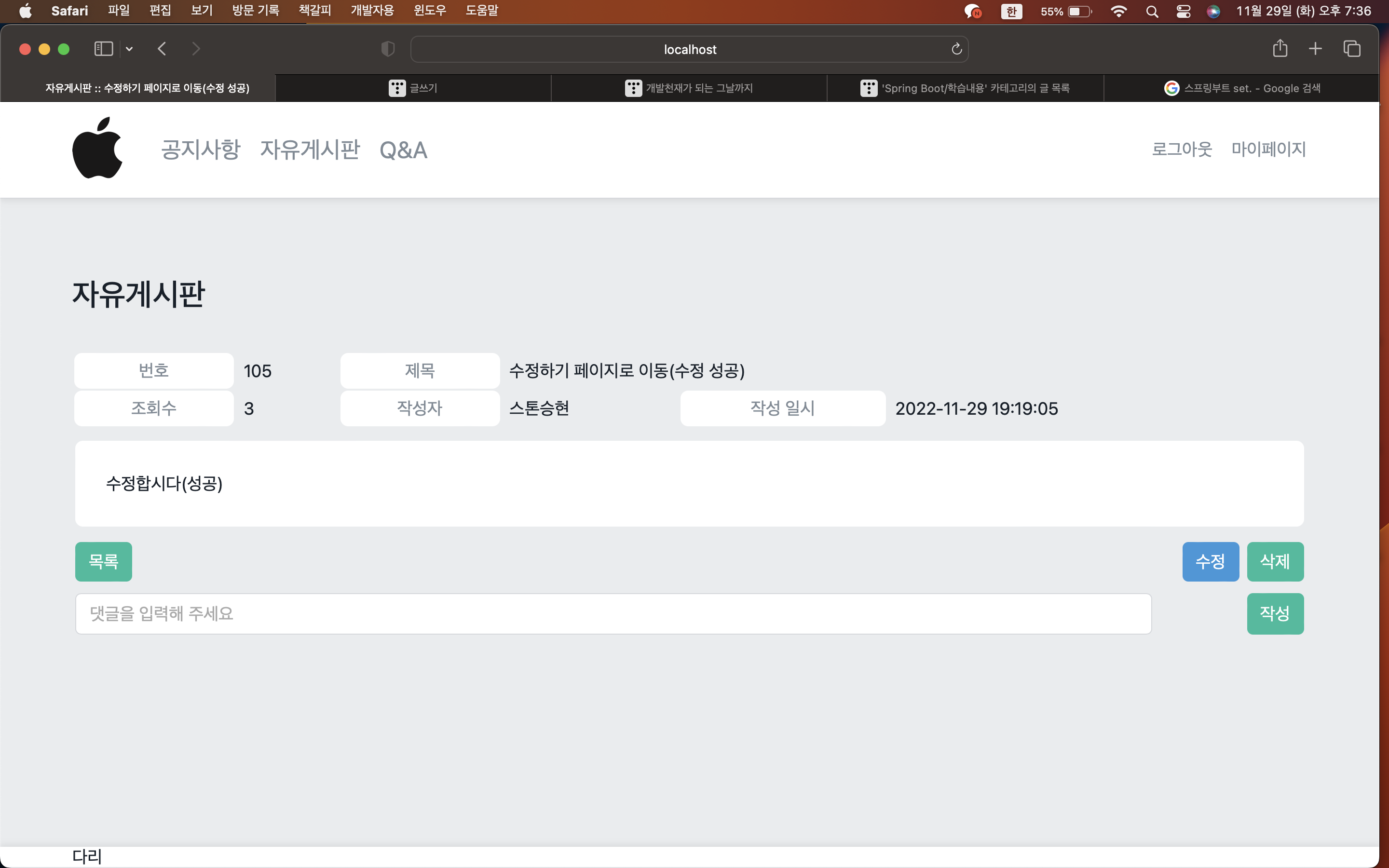
4. 글 수정 성공 시, /bbs/modify?aid=x 로 이동하기.
- BbsController
@RequestMapping(value = "modify",
method = RequestMethod.GET,
produces = MediaType.TEXT_HTML_VALUE)
public ModelAndView getModify(@SessionAttribute(value = "user", required = false) UserEntity user,
                              @RequestParam(value = "aid") int aid) {
    ModelAndView modelAndView = new ModelAndView("bbs/modify");

    return modelAndView;
}
1번의 bbs/modify 페이지에서 aid값을 가져오려면 우선 GET메서드가 필요하다.
ModelAndView를 사용하여 SeossionAttribute를 통해 로그인한 유저의 정보를 가져오고 aid를 매개 변수로 넣어준다.
ModelAndView를 통해 페이지를 열 수 있도록 조치해준다.
2번을 하기 위해서 xml과 interface를 만들어 준다.
- BbsMapper.xml
<select id="selectArticleByIndex"
        resultType="dev.shlee.studymemberbbs.vos.bbs.ArticleReadVo">
    SELECT `index`         AS `index`,
           `user_email`    AS `userEmail`,
           `board_id`      AS `boardId`,
           `title`         AS `title`,
           `content`       AS `content`,
           `view`          AS `view`,
           `written_on`    AS `writtenOn`,
           `modified_on`   AS `modifiedOn`,
           `user`.nickname AS `userNickname`
    FROM `study_bbs`.`articles` AS `article`
             LEFT JOIN `study_member`.`users` AS `user` ON `article`.`user_email` = `user`.`email`
    WHERE BINARY `index` = #{index}
    LIMIT 1
</select>
update를 하기 위해서 select가 필요하기 때문에 기존에 사용했었던 selectArticleByIndex를 가져와서 사용해주면 된다.
- IBbsMapper.interface
ArticleReadVo selectArticleByIndex(@Param(value = "index") int index);- BbsService
public Enum<? extends IResult> prepareModifyArticle(ArticleEntity article, UserEntity user) {
    if(user == null) {
        return ModifyArticleResult.NOT_SIGNED;
    }
    ArticleEntity existingArticle = this.bbsMapper.selectArticleByIndex(article.getIndex());
    if(existingArticle == null) {
        return ModifyArticleResult.NO_SUCH_ARTICLE;
    }
    if(!existingArticle.getUserEmail().equals(user.getEmail())) {
        return ModifyArticleResult.NOT_ALLOWED;
    }
    article.setIndex(existingArticle.getIndex());
    article.setUserEmail(existingArticle.getUserEmail());
    article.setBoardId(existingArticle.getBoardId());
    article.setTitle(existingArticle.getTitle());
    article.setContent(existingArticle.getContent());
    article.setView(existingArticle.getView());
    article.setWrittenOn(existingArticle.getWrittenOn());
    article.setModifiedOn(existingArticle.getModifiedOn());
    return CommonResult.SUCCESS;
}
열거형 형태로 사용해야 하기 때문에 Enum을 사용하고 매개변수로 ArticleEntity와 UserEntity를 지정해준다.
만약 user가 null이라면 로그인이 되지 않은 것이기 때문에 NOT_SIGNED를 리턴한다.
그 후, xml에서 만들었던 selectArticleByIndex를 index기준으로 값들을 다 가져와서 existingArticel에 넣어준다.
만약 existingArticle이 null이라면 게시글이 없는 것이므로 NO_SUCH_ARTICLE을 리턴한다.
그 후, select해온 UserEmail과 UserEntity의 userEmail을 비교하여 같지 않다면 NOT_ALLOWED를 리턴해준다.
이제 가져온 값들을 업데이트해주어야 한다.
selectArticleByIndex를 통해 가져온 값들을 article.set을 통해 전부 업데이트해주고 SUCCESS를 반환한다.
- BbsController
@RequestMapping(value = "modify",
method = RequestMethod.GET,
produces = MediaType.TEXT_HTML_VALUE)
public ModelAndView getModify(@SessionAttribute(value = "user", required = false) UserEntity user,
                              @RequestParam(value = "aid") int aid) {
    ModelAndView modelAndView = new ModelAndView("bbs/modify");
    ArticleEntity article = new ArticleEntity();
    article.setIndex(aid);
    Enum<?> result = this.bbsService.prepareModifyArticle(article, user);
    modelAndView.addObject("article", article);
    modelAndView.addObject("result", result.name());
    if (result == CommonResult.SUCCESS) {
        modelAndView.addObject("board", this.bbsService.getBoard(article.getBoardId()));
    }
    return modelAndView;
}
Controller로 돌아와서 article을 객체화해주고 article.setIndex에 aid값을 넣어준다.
Service에서 만들었던 preparModifyArticle에서 aid값과 로그인되어 있는 user를 기준으로 값들을 result에 넣는다.
modelandView.addObject를 통해 article과 result를 추가해준다.
만약 result가 SUCCESS라면 article.getBoardID를 board로 추가해준다.


이렇게 클릭하였을 때 페이지로 이동이 된다면 성공한 것이다. 반틈만,,, 이제 수정하는 작업을 해야 한다!
우선 update문을 xml에 만들어준다.
- BbsMapper.xml
<update id="updateArticle"
        parameterType="dev.shlee.studymemberbbs.entities.bbs.ArticleEntity">
    UPDATE `study_bbs`.`articles`
    SET `user_email`  = #{userEmail},
        `board_id`    = #{boardId},
        `title`       = #{title},
        `content`     = #{content},
        `view`        = #{view} + 1,
        `written_on`  = #{writtenOn},
        `modified_on` = #{modifiedOn}
    WHERE `index` = #{index}
    LIMIT 1
</update>
- IBbsMapper.interface
int updateArticle(ArticleEntity article);- BbsService
public Enum<? extends IResult> modifyArticle(ArticleEntity article, UserEntity user) {
    if (user == null) {
        return ModifyArticleResult.NOT_SIGNED;
    }
    ArticleEntity existingArticle = this.bbsMapper.selectArticleByIndex(article.getIndex());
    if(existingArticle == null) {
        return ModifyArticleResult.NO_SUCH_ARTICLE;
    }
    if(!existingArticle.getUserEmail().equals(user.getEmail())) {
        return ModifyArticleResult.NOT_ALLOWED;
    }
    existingArticle.setTitle(article.getTitle());
    existingArticle.setContent(article.getContent());
    existingArticle.setModifiedOn(new Date());
    return this.bbsMapper.updateArticle(existingArticle) > 0
            ? CommonResult.SUCCESS
            : CommonResult.FAILURE;
}
서비스 부분은 if문까지는 우의 서비스 구문과 동일하다.
수정을 하기 위해 필요한 것들은 title, content, modifiedOn이다. 이것들을 set 해줘야 한다.
위에서 만들었던 existingArticle에 담겨있는 getTitle, getContent, modifiedOn을 set을 통해 업데이트 해준 다음 existingArticle을 업데이트 한 값들을 0과 비교하여 크다면 SUCCESS 작다면 FAILURE를 return 해준다.
- BbsController
@RequestMapping(value = "modify",
method = RequestMethod.PATCH,
produces = MediaType.APPLICATION_JSON_VALUE)
@ResponseBody
public String patchModify(@SessionAttribute(value = "user", required = false) UserEntity user,
                          @RequestParam(value = "aid") int aid,
                          ArticleEntity article) {
    article.setIndex(aid);
    Enum<?> result = this.bbsService.modifyArticle(article, user);
    JSONObject responseObject = new JSONObject();
    responseObject.put("result", result.name().toLowerCase());
    if (result == CommonResult.SUCCESS) {
        responseObject.put("aid", aid);
    }
    return responseObject.toString();
}
update를 하여야 하기 때문에 PATCH를 사용한다.
Controller부분은 위의 Controller와 다를 것이 없어서 생략! 단지 aid 값을 put 해준다는 것이 다른 점!
- modify.js
const form = window.document.getElementById('form');
const Warning = {
    getElementById: () => form.querySelector('[rel="warningRow"]'),
    show: (text) => {
        const warningRow = Warning.getElementById();
        warningRow.querySelector('.text').innerText = text;
        warningRow.classList.add('visible');

    },
    hide: () => Warning.getElementById().classList.remove('visible')
};


let editor;
ClassicEditor
    .create(form['content'], {
        simpleUpload: {
            uploadUrl: './image'
        }
    })
    .then(e => editor = e);

form['back'].addEventListener('click', () =>
    window.history.length < 2 ? window.close() : window.history.back());

form.onsubmit = e => {
    e.preventDefault();
    Warning.hide();

    if (form['title'].value === '') {
        Warning.show('제목을 입력해 주세요.');
        form['title'].focus();
        return false;
    }

    if (editor.getData() === '') {
        Warning.show('내용을 입력해 주세요.');
        editor.focus();
        return false;
    }

    Cover.show('게시글을 작성하고 있습니다.\n잠시만 기다려 주세요.');
    const xhr = new XMLHttpRequest();
    const formData = new FormData();
    formData.append('title', form['title'].value);
    formData.append('content', editor.getData());
    // formData.append('index', form['index'].value);
    // xhr.open('POST', window.location.href);
    xhr.open('PATCH', window.location.href);
    xhr.onreadystatechange = () => {
        if (xhr.readyState === XMLHttpRequest.DONE) {
            Cover.hide();
            if (xhr.status >= 200 && xhr.status < 300) {
                const responseObject = JSON.parse(xhr.responseText);
                switch (responseObject['result']) {
                    case 'no_such_article':
                        Warning.show('게시글을 수정할 수 없습니다, 게시글이 존재하지 않습니다.');
                        break;
                    case'not_allowed':
                        Warning.show('게시글을 수정할 수 있는 권한이 없거나 로그아웃되었습나다. 확인 후 다시 시도해 주세요.');
                        break;
                    case'success':
                        const aid = responseObject['aid'];
                        window.location.href = `read?aid=${aid}`;
                        break;
                    default:
                        Warning.show('알 수 없는 이유로 게시글을 작성하지 못하였습니다. 잠시 후 다시 시도해 주새요.');
                }
            } else {
                Warning.show('서버와 통신하지 못하였습니다. 잠시 후 다시 시도해 주세요.');
            }
        }
    };
    xhr.send(formData);
}
'웹 개발 > SpringBoot' 카테고리의 다른 글
| [Spring Boot] 게시판 만들기7 (댓글 수정) (0) | 2022.11.26 |
|---|---|
| [Spring Boot] 게시판 만들기6 (댓글 삭제) (0) | 2022.11.25 |
| [Spring Boot] 게시판 만들기 5 (댓글 달기 ) (2) | 2022.11.24 |
| [Spring Boot] 게시판 만들기4 (게시판 댓글 DB insert) (2) | 2022.11.21 |
| [Spring Boot] 게시판 만들기3 (게시글 Insert 하기) (1) | 2022.11.18 |