
티스토리 뷰
- BbsMapper.xml
<select id="selectCommentByIndex"
        resultType="dev.shlee.studymemberbbs.entities.bbs.CommentEntity">
    SELECT `index`         AS `index`,
           `comment_index` AS `commentIndex`,
           `user_email`    AS `userEmail`,
           `article_index` AS `articleIndex`,
           `content`       AS `content`,
           `written_on`    AS `writtenOn`
    FROM `study_bbs`.comments
    WHERE `index` = #{index}
    LIMIT 1
</select>

<delete id="deleteCommentByIndex">
    DELETE
    FROM `study_bbs`.`comments`
    WHERE `index` = #{index}
    LIMIT 1
</delete>
댓글을 삭제하기 위해서 댓글이 있는지의 여부, 삭제하려는 댓글이 나의 댓글인지의 여부를 알아야 한다.
우선 댓글이 있는지의 여부를 알기 위해서는 댓글의 index 번호를 알아야 하므로 selectCommentByIndex를 활용하여 댓글의 index값을 가져온다.
그리고 삭제하기 위한 DELETE도 만들어 준다. DELETE를 할 때는 index값이 유일성을 가지므로 조건에 index를 넣어주면 된다.
- IBbsMapper.interface
int deleteCommentByIndex(@Param(value = "index") int index);

CommentEntity selectCommentByIndex(@Param(value = "index") int index);
서비스에서 사용하기 위해 인터페이스 부분을 추가해준다.
- BbsService
public Enum<? extends IResult> deleteComment(CommentEntity comment, UserEntity user) {
    CommentEntity existingComment = this.bbsMapper.selectCommentByIndex(comment.getIndex());
    if(existingComment == null) {
        return CommentDeleteResult.NO_SUCH_COMMENT;
    }
    if(user == null || !user.getEmail().equals(existingComment.getUserEmail())) {
        return CommentDeleteResult.NOT_ALLOWED;
    }
    return this.bbsMapper.deleteCommentByIndex(comment.getIndex()) > 0
            ? CommonResult.SUCCESS
            : CommonResult.FAILURE;
}
댓글이 존재하는지의 여부를 알기 위해 existingComment에 댓글의 인덱스(번호)를 넣어준 후 if문을 통해 댓글의 인덱스가 null일 때,
NO_SUCH_COMMENT(댓글을 찾을 수 없음)을 리턴해 준다.
그 후, 매개변수로 받아온 UserEntity user을 통해 user의 존재 여부와 user의 이메일과 댓글을 작성한 user의 이메일이 같은지의 여부를 비교하고 다르다면
NOT_ALLOWED(권한이 없음)을 리턴해 준다.
위의 리턴 값들이 다 통과했다면 이제는 성공, 실패 여부만 판단하면 되기 때문에 comment에서 가져온 index가 0보다 큰지의 여부를 판단하여
ture라면 SUCCESS값을, false라면 FAILURE값을 리턴한다.
- BbsController
@RequestMapping(value = "comment",
            method = RequestMethod.DELETE, // 레스트 주소들 달리하고 방식이 다른것. DELETE는 아무 의미가 없다.
            produces = MediaType.APPLICATION_JSON_VALUE)
    @ResponseBody
    public String deleteComment(@SessionAttribute(value = "user", required = false) UserEntity user,
                                CommentEntity comment) { //CommentEntity -> index 값을 가져오기 위해서
//        formData.append('index', commentObject['index']);
//        setIndex
//        삭제 할 수 있는 유일한 방법 -> index(겹칠 가능성이 없음)
        Enum<?> result = this.bbsService.deleteComment(comment, user);
        // {result:"failure"}
        JSONObject responseJson = new JSONObject();
        responseJson.put("result", result.name().toLowerCase());
        return responseJson.toString();
    }
컨트롤러에서는 유저의 로그인 여부를 알기 위하여 @SessionAttribute를 가져오고 UserEntity user와 CommentEntity comment를 받아온다.
서비스에서 리턴한 값을 result에 넣어준다.
- read.js
//댓글 삭제
const dom = domParser.parseFromString(commentHtmlText, 'text/html');

dom.querySelector('[rel="actionDelete"]')?.addEventListener('click', e => {
    e.preventDefault();
    replyFormElement.classList.add('visible');

    if (!confirm('정말로 댓글을 삭제할까요?')) {
        return;
    }
    const xhr = new XMLHttpRequest();
    const formData = new FormData();
    formData.append('index', commentObject['index']);

    xhr.open('DELETE', './comment');
    xhr.onreadystatechange = () => {
        if (xhr.readyState === XMLHttpRequest.DONE) {
            if (xhr.status >= 200 && xhr.status < 300) {
                const responseObject = JSON.parse(xhr.responseText);
                switch (responseObject['result']) {
                    case'success':
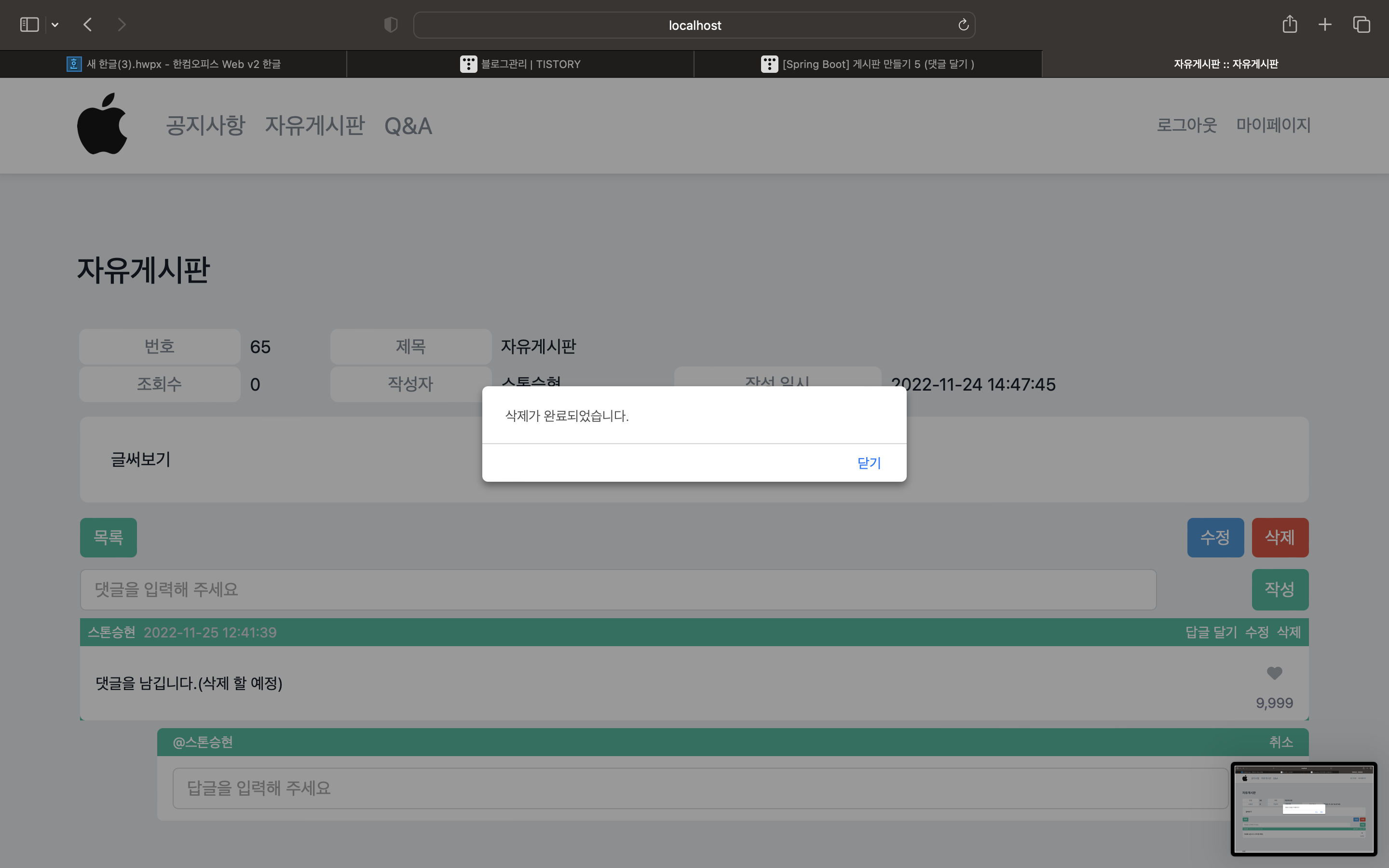
                        alert('삭제가 완료되었습니다.');
                        loadComments();
                        break;
                    case 'no_such_comment':
                        alert('삭제하려는 댓글이 더 이상 존재하지 않습니다.\n\n이미 삭제되었을 수도 있습니다.');
                        break;
                    case 'not_allowed':
                        alert('해당 댓글을 삭제할 권한이 없습니다.');
                        break;
                    default:
                        Warning.show('삭제 실패하였습니다.')
                }
            } else {
                Warning.show('서버와 통신하지 못하였습니다. 잠시 후 다시 시도해주세요.')
            }
        }
    };
    xhr.send(formData);
});
Document 문서에 맞는 XML 및 HTML 소스 코드를 해석할 수 있는 기반을 제공하는 DOMParsr을 통해 이벤트를 만든다.
if문을 통해 삭제 여부를 한번 더 물어볼 수 있도록 alert를 사용한다.
그 후, xhr을 통해 result값으로 이벤트를 만들어 주면 끝!!


'웹 개발 > SpringBoot' 카테고리의 다른 글
| [Spring Boot] 게시판 만들기8 (게시글 수정) (2) | 2022.11.29 |
|---|---|
| [Spring Boot] 게시판 만들기7 (댓글 수정) (0) | 2022.11.26 |
| [Spring Boot] 게시판 만들기 5 (댓글 달기 ) (2) | 2022.11.24 |
| [Spring Boot] 게시판 만들기4 (게시판 댓글 DB insert) (2) | 2022.11.21 |
| [Spring Boot] 게시판 만들기3 (게시글 Insert 하기) (1) | 2022.11.18 |