
티스토리 뷰
read.html
<tr class="comment-row">
    <td colspan="6">
        <form class="comment-form" id="commentForm">
            <label class="label">
                <span hidden>댓글작성</span>
                <input class="--object-input" id="objectInput" maxlength="100" name="content"
                       placeholder="댓글을 입력해 주세요" type="text">
            </label>
            <input type="hidden" th:value="${article.getIndex()}" name="aid">
            <input class="--object-button" type="submit" value="작성">
        </form>
        <div class="comment-container" id="commentContainer">
            <div class="comment mine">
                <div class="head">
                    <span class="writer">관리자</span>
                    <span class="dt">2022-01-01 00:00:00</span>
                    <span class="spring"></span>
                    <span class="action-container">
                    <a class="action reply" href="#">
                        답글달기
                    </a>
                    <a class="action delete" href="#">
                        삭제
                    </a>
                </span>
                </div>
                <div class="body">1등</div>
            </div>
            <form class="reply-form">
                <label class="label">
                    <span hidden>답글작성</span>
                    <input class="--object-input" maxlength="100" name="content"
                           placeholder="답글을 입력해 주세요" type="text">
                </label>
                <input class="--object-button" type="submit" value="작성">
            </form>
            <div class="comment sub">
                <div class="head">
                    <span class="writer">누구</span>
                    <span class="dt">2022-01-01 00:00:00</span>
                    <span class="spring"></span>
                    <span class="action-container">
                    <a class="action reply" href="#">
                        답글달기
                    </a>
                    <a class="action delete" href="#">
                        삭제
                    </a>
                </span>
                </div>
                <div class="body">zz</div>
            </div>
            <div class="comment sub mine">
                <div class="head">
                    <span class="writer">누구</span>
                    <span class="dt">2022-01-01 00:00:00</span>
                    <span class="spring"></span>
                    <span class="action-container">
                    <a class="action reply" href="#">
                        답글달기
                    </a>
                    <a class="action delete" href="#">
                        삭제
                    </a>
                </span>
                </div>
                <div class="body">ss</div>
            </div>
        </div>
    </td>
</tr>
read.css
#commentForm {
    display: flex;
    flex-direction: row;
    align-items: stretch;
    justify-content: flex-start;

    margin-top: 0.5rem;
}

#commentForm > .label {
    flex: 1;
    margin-right: 0.5rem;
}

#objectInput {
    width: 92.5%;
}

#commentContainer {
    display: flex;
    flex-direction: column;
    align-items: stretch;
    justify-content: flex-start;
    margin-top: 0.5rem;

}

#commentContainer .comment {
    display: flex;
    flex-direction: column;
    align-items: stretch;
    justify-content: flex-start;

}

#commentContainer .comment > .head {
    display: flex;
    flex-direction: row;
    align-items: center;
    justify-content: flex-start;

    background-color: rgb(128, 139, 150);
    color: rgb(255, 255, 255);
    font-size: 0.9rem;
    padding: 0.375rem 0.5rem;
    border-top-left-radius: 0.375rem;
    border-top-right-radius: 0.375rem;
}

#commentContainer .comment > .head > .dt {
    color: rgb(213, 216, 220);
    margin-left: 0.5rem;
}

#commentContainer .comment > .head > .spring {
    flex: 1;
}

#commentContainer .comment > .head > .action-container {
    display: flex;
    flex-direction: row;
    align-items: center;
    justify-content: flex-start;
}

#commentContainer .comment > .head > .action-container > .action {
    color: inherit;
    text-decoration: none;
}

#commentContainer .comment > .head > .action-container > .action:hover {
    text-decoration: none;
}

#commentContainer .comment > .head > .action-container > .action + .action {
    margin-left: 0.5rem;
}

#commentContainer .comment > .body {
    background-color: rgb(255, 255, 255);
    font-size: 1rem;
    padding: 0.75rem 1rem;
    border-bottom-left-radius: 0.375rem;
    border-bottom-right-radius: 0.375rem;
}

#commentContainer .reply-form {
    display: flex;
    flex-direction: row;
    align-items: stretch;
    justify-content: flex-start;
    margin-top: 0.5rem;
    margin-left: 5rem;
}

#commentContainer .reply-form > .label {
    flex: 1;
    margin-right: 0.5rem;
}

#commentContainer .comment.sub {
    margin-left: 5rem;
}

#commentContainer .comment.mine {
    background-color: rgb(26, 188, 156);
}

#commentContainer .comment.mine > .head {
    background-color: rgb(26, 188, 156);
}

#commentContainer > * + * {
    margin-top: 0.5rem;
}
BbsMapper.xml
<select id="selectCommentsByArticleIndex"
        resultType="dev.shlee.studymemberbbs.entities.bbs.CommentEntity">
    SELECT `index`         AS `index`,
           `comment_index` AS `commentIndex`,
           `user_email`    AS `userEmail`,
           `article_index` AS `articleIndex`,
           `content`       AS `content`,
           `written_on`    AS `writtenOn`
    FROM `study_bbs`.comments
    WHERE `article_index` = #{articleIndex}
    ORDER BY `index`
</select>
우선 댓글들을 화면에 불러와야 하기 때문에 comments테이블을 select 해준다.
우선 댓글은 무수히 많이 달릴 수도 있기 때문에 배열을 사용해야 하는데 배열은 순서가 없다.
그러므로 ORDER BY `index`를 하여 index 순서대로 위치할 수 있도록 한다.
IBbsMapper.interface
CommentEntity[] selectCommentsByArticleIndex(@Param(value = "articleIndex") int articleIndex);Service를 사용할 수 있도록 인터페이스에서 정의해준다.
BbsService
public CommentEntity[] getComments(int articleIndex) {
    return this.bbsMapper.selectCommentsByArticleIndex(articleIndex);
}
매개변수로 int articleIndex를 주어 articleIndex(aid) 값을 기준으로 가져온 값들을 return 해준다.
BbsController
@RequestMapping(value = "comment",
method = RequestMethod.GET,
produces = MediaType.APPLICATION_JSON_VALUE)
@ResponseBody
public String getComment(@RequestParam(value = "aid") int articleIndex) {
    JSONArray responseArray = new JSONArray(); // 댓글이 많으니깐 배열로 받는다.
    CommentEntity[] comments = this.bbsService.getComments(articleIndex);
    //서비스에서 받아온 aid번호를 기준으로 select한 값들을 comments에 넣어주고 향상된 for문을 통해서 그 값들을 하나씩 추출한다.
    for (CommentEntity comment : comments) {
        JSONObject commentObject = new JSONObject();
        commentObject.put("index", comment.getIndex());
        commentObject.put("commentIndex", comment.getCommentIndex());
        commentObject.put("userEmail", comment.getUserEmail());
        commentObject.put("articleIndex", comment.getArticleIndex());
        commentObject.put("content", comment.getContent());
        commentObject.put("writtenOn", new SimpleDateFormat("yyy-MM-dd HH:mm:ss").format(comment.getWrittenOn()));
        //new SimpleDateFormat("형식").format([Date 타입 객체]) : [Date 타입 객체]가 가진 일시를 원하는 형식의 문자열로 만들어 반환한다.
        responseArray.put(commentObject); // 다 추출한 한 덩어리가 0 번째 인덱스로 들어가게 된다.
    }

    return responseArray.toString();
}
articleIndex(aid) 기준으로 값들을 가져와야 하기 때문에 매개 변수로 int articleIndex를 선언해준다.
댓글은 많기 때문에 JSONArray를 사용하여 배열로 받아준다.
향상된 for문을 사용하기 위해 CommentEntity [] comments를 생성해주고 comments의 값들을 하나씩 추출한다. 이때 comments의 값에는 articleIndex를 기준으로 가져온 값들이 담기게 된다.
JSONObject commentObject = new JSONObject(); 를 통해 가져온 값들을 commentObject에 넣어준다.
그다음 reponseArray.put(commentObject)를 통해 배열에 담아주면 된다.
read.js
const commentForm = window.document.getElementById('commentForm');
const commentContainer = window.document.getElementById('commentContainer');

const loadComments = () => {
    commentContainer.innerHTML = '';

    const url = new URL(window.location.href);
    const searchParams = url.searchParams;// ?뒤를 담당
    const aid =searchParams.get('aid');
    const xhr = new XMLHttpRequest();
    xhr.open('GET', `./comment?aid=${aid}`);
    xhr.onreadystatechange = () => {
        if (xhr.readyState === XMLHttpRequest.DONE) {
            if (xhr.status >= 200 && xhr.status < 300) {

            } else {
            }
        }
    };
    xhr.send();
};
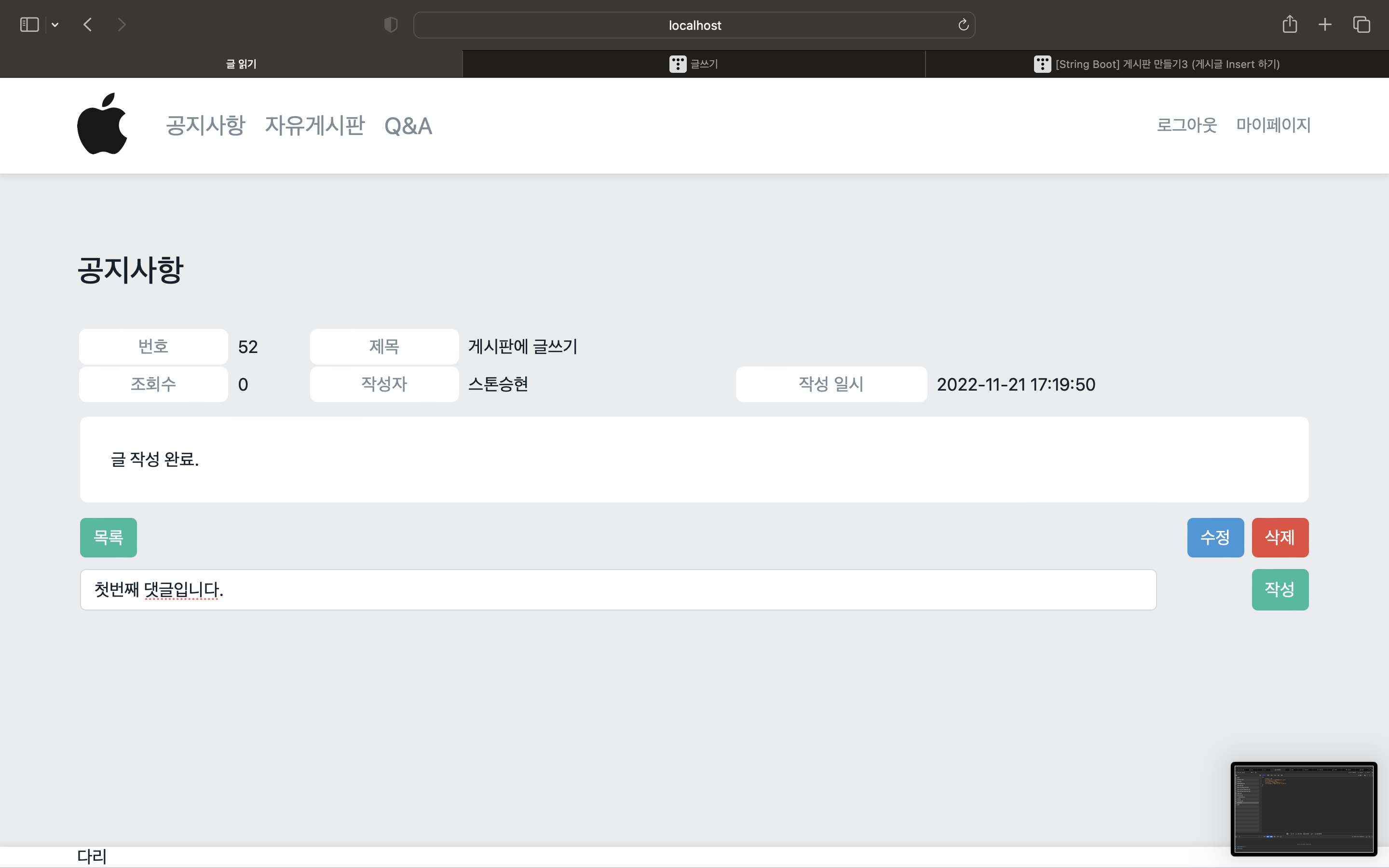
밑의 사진처럼 댓글을 작성하였을 때 오른쪽 사진의 모습처럼 나와야 하므로 innerHTML을 사용한다.
const url에 현재 페이지의 주소를 할당해 주고, const aid에는 현재 페이지 주소에서 aid값을 가져와 할당해 준다.
예를 들어 50번 article_index를 가지는 게시물에 댓글을 달아야 하지만 article_index값을 모르거나 잘못 지정한다면 49번이나 51번 등 다른 게시물에 댓글을 작성하게 되는 상황이 발생하기 때문에 aid를 지정해 주어야 한다.
xhr.open을 하는데 현재페이지의 주소에서 가져온 aid값을 가져와 페이지를 열 수 있도록 해준다.



'웹 개발 > SpringBoot' 카테고리의 다른 글
| [Spring Boot] 게시판 만들기6 (댓글 삭제) (0) | 2022.11.25 |
|---|---|
| [Spring Boot] 게시판 만들기 5 (댓글 달기 ) (2) | 2022.11.24 |
| [Spring Boot] 게시판 만들기3 (게시글 Insert 하기) (1) | 2022.11.18 |
| [Spring Boot] 게시판 만들기2(게시판 구분) (0) | 2022.11.16 |
| [Spring Boot] 게시판 만들기 (0) | 2022.11.15 |