
티스토리 뷰
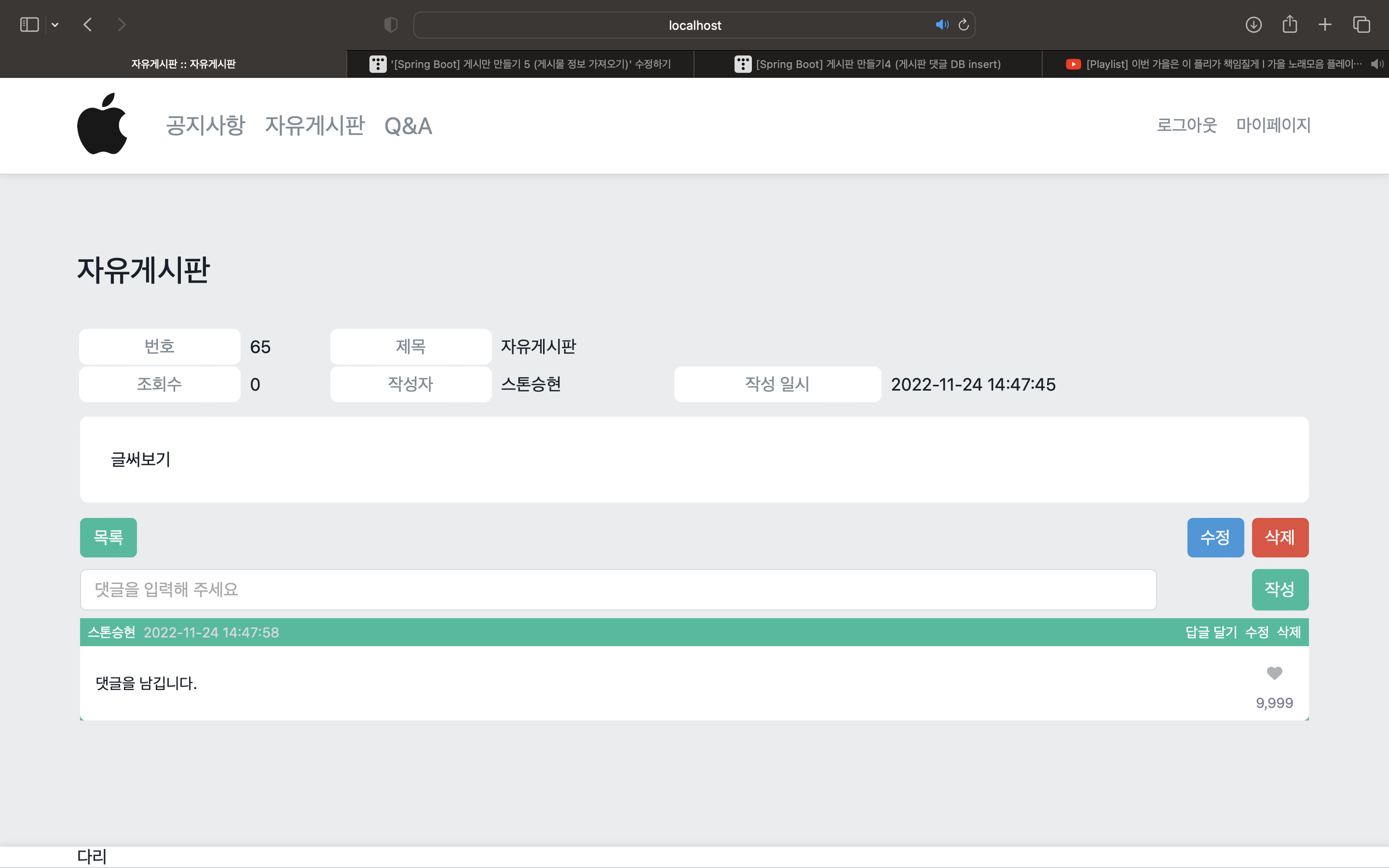
위의 사진처럼 댓글을 남기는 것과 댓글에 닉네임(스톤승현)이 나오도록 하는 것이 목표이다.
- CommentVo
package dev.shlee.studymemberbbs.vos.bbs;

import dev.shlee.studymemberbbs.entities.bbs.CommentEntity;

public class CommentVo extends CommentEntity {
    private String userNickname;
    private boolean isSigned;

    private boolean isMine;

    private boolean isLiked;

    public String getUserNickname() {

        return userNickname;
    }

    public void setUserNickname(String userNickname) {

        this.userNickname = userNickname;
    }

    public boolean isSigned() {
        return isSigned;
    }

    public void setSigned(boolean signed) {
        isSigned = signed;
    }

    public boolean isMine() {
        return isMine;
    }

    public void setMine(boolean mine) {
        isMine = mine;
    }
}
댓글을 달기 위해서는 CommentEntity의 정보와 user의 nickname정보가 필요하다. 원래 방식이었다면 CommentEntity를 가져오면 되지만 이번에는 user의 닉네임도 가져와야 하므로 CommentVo라는 클래스를 따로 만들어 준다.
CommentVo는 CommentEntity를 상속 받으며 getUserNickname과 setUserNickname을 가지고 있게 된다.
- BbsMapper.xml
<select id="selectCommentsByArticleIndex"
        resultType="dev.shlee.studymemberbbs.vos.bbs.CommentVo">
    SELECT `index`           AS `index`,
           `comment_index`   AS `commentIndex`,
           `user_email`      AS `userEmail`,
           `article_index`   AS `articleIndex`,
           `content`         AS `content`,
           `written_on`      AS `writtenOn`,
           `user`.`nickname` AS `userNickname`
    FROM `study_bbs`.comments AS `comment`
             LEFT JOIN `study_member`.`users` AS `user` ON `comment`.`user_email` = `user`.`email`
    WHERE `comment`.`article_index` = #{articleIndex}
    ORDER BY `index`
</select>
게시글의 정보와 닉네임을 같이 가져오기 위하여 resultType으로 CommetVo를 받는다.
그리고 LEFT JOIN을 사용하여 user의 정보와 user의 email을 조인한다. 이렇게 하면 로그인되어있는 user와 게시물을 작성하는 user의 이메일 기준으로 겹쳐지게 된다.
마지막으로 ORDER BY를 통하여 index를 기준으로 정렬해 준다.
- IBbsMapper.interface
CommentVo[] selectCommentsByArticleIndex(@Param(value = "articleIndex") int articleIndex);서비스에서 사용하기 CommentVo를 배열로 설정하고 value에 articleIndex(게시물번호)를 추가하여 준다.
- BbsService
public CommentEntity[] getComments(int articleIndex) {
    return this.bbsMapper.selectCommentsByArticleIndex(articleIndex);
}
articleIndex를 매개변수로 설정해주고 articleIndex를 기준으로 값들을 가져오게 리턴해준다.
CommentEntity[]에 배열로 만든 이유는 댓글은 무수히 많기 때문에 배열로 받아줘야 한다고 생각하였다.
- BbsController
@RequestMapping(value = "comment",
            method = RequestMethod.GET,
            produces = MediaType.APPLICATION_JSON_VALUE)
    @ResponseBody
    public String getComment(@SessionAttribute(value = "user", required = false) UserEntity user,
                             @RequestParam(value = "aid") int articleIndex) {
        JSONArray responseArray = new JSONArray();
       CommentVo[] comments = this.bbsService.getComment(articleIndex, user);
        for (CommentVo comment : comments) {
            JSONObject commentObject = new JSONObject();
            commentObject.put("index", comment.getIndex());
            commentObject.put("commentIndex", comment.getCommentIndex());
            commentObject.put("userEmail", comment.getUserEmail());
            commentObject.put("articleIndex", comment.getArticleIndex());
            commentObject.put("content", comment.getContent());
            commentObject.put("writtenOn", new SimpleDateFormat("yyy-MM-dd HH:mm:ss").format(comment.getWrittenOn()));
            commentObject.put("nickname",comment.getUserNickname());
            commentObject.put("isSigned", user != null);
            commentObject.put("isMine", user != null && user.getEmail().equals(comment.getUserEmail()));

            responseArray.put(commentObject);

        }
매개변수로 @SessionAttribute를 사용하여 로그인되어 있는 user의 정보와 aid를 갖는다.
서비스에서 배열로 설정하였기 때문에 Controller에서도 JSONArray를 통해 배열로 받는다.
서비스에서 받아온 aid번호를 기준으로 select한 값들을 comments에 넣어주고 향상된 for문을 통해 그 값들을 하나씩 꺼내어 comment에 담는다.
new SimpleDateFormat("형식").format([Date 타입 객체]) : [Date 타입 객체]가 가진 일시를 원하는 형식의 문자열로 만들어 반환한다.
마지막으로 responseArray.put(commentObject);를 하면 다 추출한 하나의 게시글이 0번째 인덱스로 들어가게 된다.
이런 식으로 하나의 댓글이 반복하게 된다.
commentVo에서 생성한 isSigned와 isMine을 사용하여 user가 null이 아니거나 로그인된 user의 이메일과 댓글을 남기는 user의 이메일을 비교한다.
- read.js
const commentForm = window.document.getElementById('commentForm');
if (commentForm != null) {
    commentForm.onsubmit = e => {
        e.preventDefault();

        if (commentForm['content'].value === '') {
            alert('댓글을 입력해 주세요.');
            commentForm['content'].focus();
            return false;
        }
        Cover.show('댓글을 작성하고 있습니다.\n잠시만 기다려 주세요.');
        const xhr = new XMLHttpRequest();
        const formData = new FormData();
        formData.append('articleIndex', commentForm['aid'].value);
        formData.append('content', commentForm['content'].value);
        xhr.open('POST', './read');
        xhr.onreadystatechange = () => {
            if (xhr.readyState === XMLHttpRequest.DONE) {
                if (xhr.status >= 200 && xhr.status < 300) {
                    Cover.hide();
                    const responseObject = JSON.parse(xhr.responseText);
                    switch (responseObject['result']) {
                        case 'success':
                            alert('댓글 작성 완료');
                            break;
                        default:
                            alert('알 수 없는 이유로 댓글을 작성하지 못하였습니다.\n\n잠시 후 다시 시도해 주세요.')
                    }
                } else {
                    alert('서버와 통신하지 못하였습니다.\n\n잠시 후 다시 시도해 주세요.')
                }
            }
        };
        xhr.send(formData);
    }
}
commentForm을 통해 content가 빈 문자열이면 "댓글을 입력해 주세요" 창이 나오도록 한다.
댓글을 작성하기 위해 필요한 articleIndex와 content를 append해주고 xhr로 서버와 통신한다.
- read.html
<!DOCTYPE html>
<html lang="ko" xmlns:th="http://www.thymeleaf.org">
<head>
    <meta charset="UTF-8">
    <meta name="viewport"
          content="width=device-width, user-scalable=no, initial-scale=1.0, maximum-scale=1.0, minimum-scale=1.0">
    <meta http-equiv="X-UA-Compatible" content="ie=edge">
    <title th:text="${board.getText()} + ' :: ' + ${article.getTitle()}"></title>
    <script th:if="${article == null}">
        alert('존재하지 않는 게시글입니다.')
        window.history.back();
    </script>
    <th:block th:replace="~{fragments/head :: common}"></th:block>
    <link rel="stylesheet" th:href="@{/bbs/resources/stylesheets/read.css}">
    <script defer th:src="@{/bbs/resources/scripts/read.js}"></script>
</head>
<body th:if="${article != null}">
<th:block th:replace="~{fragments/body :: header}"></th:block>
<th:block th:replace="~{fragments/body :: cover}"></th:block>
<main class="--main main">
    <div class="--content content">
        <h1 class="title" th:text="${board.getText()}"></h1>
        <table class="table">
            <thead>
            <tr>
                <th>번호</th>
                <td th:text="${article.getIndex()}"></td>
                <th>제목</th>
                <td colspan="3" th:text="${article.getTitle()}">뭘 봐 이 자식들아</td>
            </tr>
            <tr>
                <th>조회수</th>
                <td th:text="${article.getView()}"></td>
                <th>작성자</th>
                <td th:text="${article.getUserNickname()}">관리자</td>
                <th>작성 일시</th>
                <td th:text="${#dates.format(article.getWrittenOn(), 'yyyy-MM-dd HH:mm:ss')}"></td>
            </tr>
            </thead>
            <tbody>
            <tr>
                <td colspan="6">
                    <div class="content-container">
                        <p th:text="${article.getContent()}">봤으면 꺼져</p>
                    </div>
                </td>
            </tr>
            </tbody>
            <tfoot>
            <tr>
                <td colspan="6">
                    <div class="button-container">
                        <a class="--object-button" href="#">목록</a>
                        <span class="spring"></span>
                        <a class="--object-button modify" href="#"
                           th:if="${session.user != null && session.user.getEmail().equals(article.getUserEmail())}">수정</a>
                        <a class="--object-button delete" href="#"
                           th:if="${session.user != null && session.user.getEmail().equals(article.getUserEmail())}">삭제</a>
                        <!-- session.user != null을 하지않을경우 뒤의 값에서 nullPointException이 뜬다.-->
                    </div>
                </td>
            </tr>
            <tr class="comment-row">
                <td colspan="6">
                    <form class="comment-form" id="commentForm" th:if="${session.user != null}">
                        <label class="label">
                            <span hidden>댓글작성</span>
                            <input class="--object-input" id="objectInput" maxlength="100" name="content"
                                   placeholder="댓글을 입력해 주세요" type="text">
                        </label>
                        <input name="aid" type="hidden" th:value="${article.getIndex()}">
                        <input class="--object-button" type="submit" value="작성">
                    </form>
                    <div class="comment-container" id="commentContainer">
                        <div class="comment mine liked">
                            <div class="head">
                                <span class="writer">관리자</span>
                                <span class="dt">2022-01-01 00:00:00</span>
                                <span class="spring"></span>
                                <span class="action-container">
                                    <a class="action reply" href="#">답글 달기</a>
                                    <a class="action modify" href="#">수정</a>
                                    <a class="action delete" href="#">삭제</a>
                                    <a class="action cancel" href="#">취소</a>
                            </span>
                            </div>
                            <div class="body">
                                <div class="content">
                                    <span class="text">댓글 내용임!</span>
                                    <div class="like">
                                        <a href="#" class="toggle">
                                            <i class="fa-solid fa-heart"></i>
                                        </a>
                                        <span class="count">9,999</span>
                                    </div>
                                </div>
                                <form class="modify-form">
                                    <label class="label">
                                        <span hidden>댓글 수정</span>
                                        <input class="--object-input" maxlength="100" name="content"
                                               placeholder="댓글을 입력해 주세요" type="text">
                                    </label>
                                    <input class="--object-button" type="submit" value="수정">
                                </form>
                            </div>
                        </div>
                        <form class="reply-form" id="replyForm">
                            <div class="head">
                                <span class="to">@관리자</span>
                                <a href="#" class="cancel">취소</a>
                            </div>
                            <div class="body">
                                <label class="label">
                                    <span hidden>답글작성</span>
                                    <input class="--object-input" maxlength="100" name="content"
                                           placeholder="답글을 입력해 주세요" type="text">
                                </label>
                                <input class="--object-button" type="submit" value="작성">
                            </div>
                        </form>
                        <div class="comment sub">
                            <div class="head">
                                <span class="writer">누구</span>
                                <span class="dt">2022-01-01 00:00:00</span>
                                <span class="spring"></span>
                                <span class="action-container">
                                    <a class="action reply" href="#">
                                        답글달기
                                    </a>
                                    <a class="action delete" href="#">
                                        삭제
                                    </a>
                            </span>
                            </div>
                            <div class="body">zz</div>
                        </div>
                        <div class="comment sub mine">
                            <div class="head">
                                <span class="writer">누구</span>
                                <span class="dt">2022-01-01 00:00:00</span>
                                <span class="spring"></span>
                                <span class="action-container">
                                <a class="action reply" href="#">
                                    답글달기
                                </a>
                                <a class="action delete" href="#">
                                    삭제
                                </a>
                            </span>
                            </div>
                            <div class="body">ss</div>
                        </div>
                    </div>
                </td>
            </tr>
            </tfoot>
        </table>
    </div>
</main>
<th:block th:replace="~{fragments/body :: footer}"></th:block>
</body>
</html>'웹 개발 > SpringBoot' 카테고리의 다른 글
| [Spring Boot] 게시판 만들기7 (댓글 수정) (0) | 2022.11.26 |
|---|---|
| [Spring Boot] 게시판 만들기6 (댓글 삭제) (0) | 2022.11.25 |
| [Spring Boot] 게시판 만들기4 (게시판 댓글 DB insert) (2) | 2022.11.21 |
| [Spring Boot] 게시판 만들기3 (게시글 Insert 하기) (1) | 2022.11.18 |
| [Spring Boot] 게시판 만들기2(게시판 구분) (0) | 2022.11.16 |