
티스토리 뷰
- registerEmailAuth.html
<!doctype html>
<html lang="ko" xmlns:th="http://www.thymeleaf.org">
<head>
<meta charset="UTF-8">
<meta name="viewport"
content="width=device-width, user-scalable=no, initial-scale=1.0, maximum-scale=1.0, minimum-scale=1.0">
<meta http-equiv="X-UA-Compatible" content="ie=edge">
<title>Document</title>
</head>
<body>
<div style="max-width: 600px;">
<div style="background-color: rgb(33, 47, 61); border-bottom: 2px solid rgb(86, 101, 115); color: rgb(234, 236, 238); font-size: 28px; font-weight:bold; padding: 20px 30px;">
스터디
</div>
<div style="line-height: 133%; padding: 30px;">
<span>안녕하세요! <b>스터디</b>입니다.</span>
<br>
<br>
<span>해당 이메일로 스터디에 회원가입을 요청하여 인증할 수 있는 번호를 발송하였습니다. 본인이 요청한 것이 맞다면 아래 인증 번호를 이용하여 회원가입을 완료해주시기 바랍니다. </span>
<br>
<br>
<code style="background-color: rgb(234, 236, 238); display: inline-block; font-size: 20px; font-weight: bold; letter-spacing: 5px; padding: 15px;" th:text="${code}">123456</code>
<br>
<br>
<span>해당 번호를 타인에게 알려줄 경우 개인정보 도용의 위험이 있습니다. 절대 타인에게 해당 인증번호를 알려주시 마세요.</span>
<br>
<br>
<span>혹시 본인이 요청한 적이 없다면 이 이메일을 폐기해 주시기 바랍니다.</span>
<br>
<br>
<span>감사합니다.</span>
</div>
<div style="background-color: rgb(234, 236, 238); border-top: 2px solid rgb(213, 216, 220);color: rgb(44, 62, 80);font-size: 12px; padding: 20px 30px;">
<span>해당 이메일은 발신 전용 이메일 주소를 사용하여 발송되었고 회신이 불가합니다. 또한 경우에 따라 이메일 수신을 거부하였어도 이와 상관없이 발송되는 이메일이 있을 수 있음으로 양지바랍니다.</span>
<br>
<br>
<i style="color:rgb(86, 101, 115);">© 2022 <a href="http://localhost:8080/" style="color: inherit;" target="_blank">Study</a> All Rights Reserved.</i>
</div>
</div>
</body>
</html>- MemberService
Context context = new Context(); //이유? 왜 why? 서비스에서 html에 변수를 넘겨주기 위해 code.. 서비스에서 html파일을 활용하기 위해
context.setVariable("code", emailAuth.getCode());

String text = this.templateEngine.process("member/registerEmailAuth", context);
MimeMessage mail = this.mailSender.createMimeMessage();
MimeMessageHelper helper = new MimeMessageHelper(mail, "UTF-8");
helper.setFrom("ljh525769@gmail.com");
helper.setTo(user.getEmail());
helper.setSubject("[스터디] 회원가입 인증 번호");
helper.setText(text,true);
this.mailSender.send(mail);

return CommonResult.SUCCESS;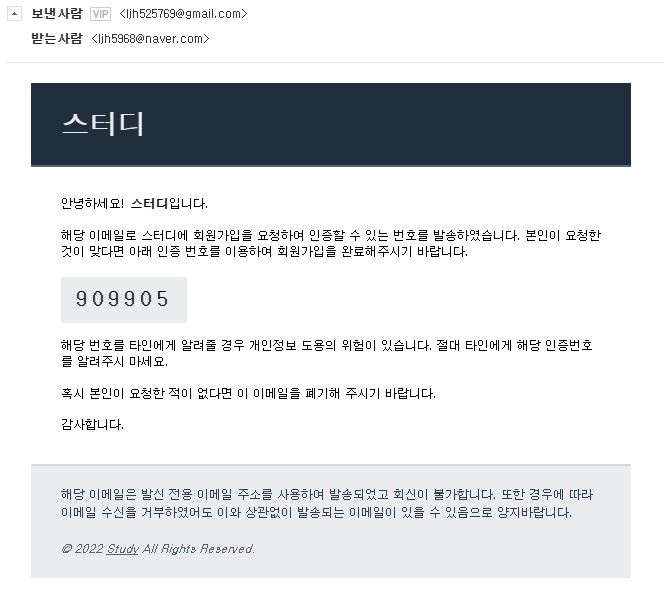
'웹 개발 > SpringBoot' 카테고리의 다른 글
| [Spring Boot] 회원 가입 구현하기 문제 (0) | 2022.11.08 |
|---|---|
| [Spring Boot] 비밀번호 암호화 (0) | 2022.11.08 |
| [String Boot] JSON (0) | 2022.11.07 |
| [String Boot] 메모장 구현 복습 Part 1 (2) | 2022.11.06 |
| [String Boot] 메모장 구현 과정 (2) | 2022.11.04 |
댓글